
Will DLS 26 Progress Carry Over to Dream League Soccer 2027?
How DLS save data works with Google and Apple sign-in and device transfer codes, and why DLS 27 carryover from DLS 26 is Not announced. Back up first.
- Verified
- Not announced
FAQ
Will my DLS 26 team move to DLS 27 automatically?
Does Google Play Games backup Dream League Soccer?
Can I still recover a profile that used Facebook Login?
How do I move my save to a new phone?
Can I use my old DLS 19 save in the current DLS app?
First Touch Games has not announced whether Dream League Soccer 27 will keep your DLS 26 squad, coins, and facilities. What you can control today is the Verified backup flow for the live Dream League Soccer 2026 build: link Sign in with Google (Android) or Sign in with Apple (iOS) in settings, because cloud backup is not automatic.
Last verified: 10 November 2026.
Fan wiki only; not affiliated with FTG. We update this page when FTG posts new save guidance.
Will your DLS 26 progress carry over, and how is save data stored?
FTG describes profile backup as signing in with your account and is not an automatic process (Verified). Your club data is stored on FTG servers when you connect Google or Apple sign-in, which also supports restoring after uninstall or device changes (Verified).
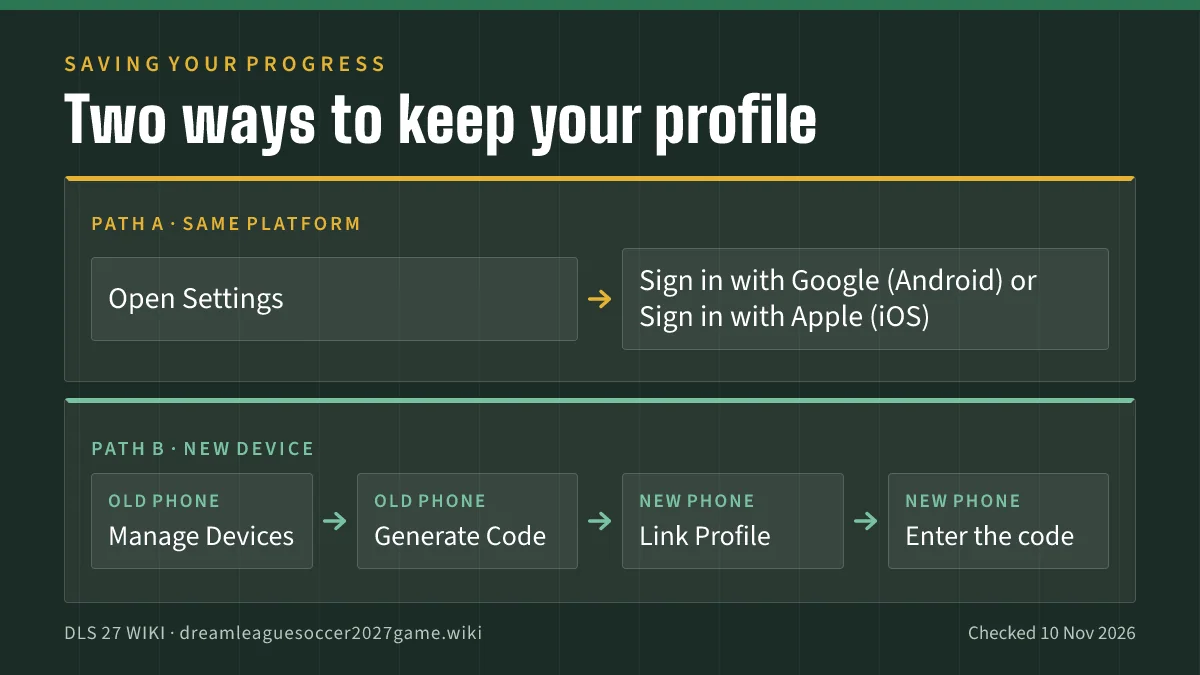
There is no separate FTG username/password account in the modern flow. Sign in with Google is not the same as Google Play Games (Verified). Each player is limited to one DLS account (Verified).
What does not back up your Dream League Soccer profile?
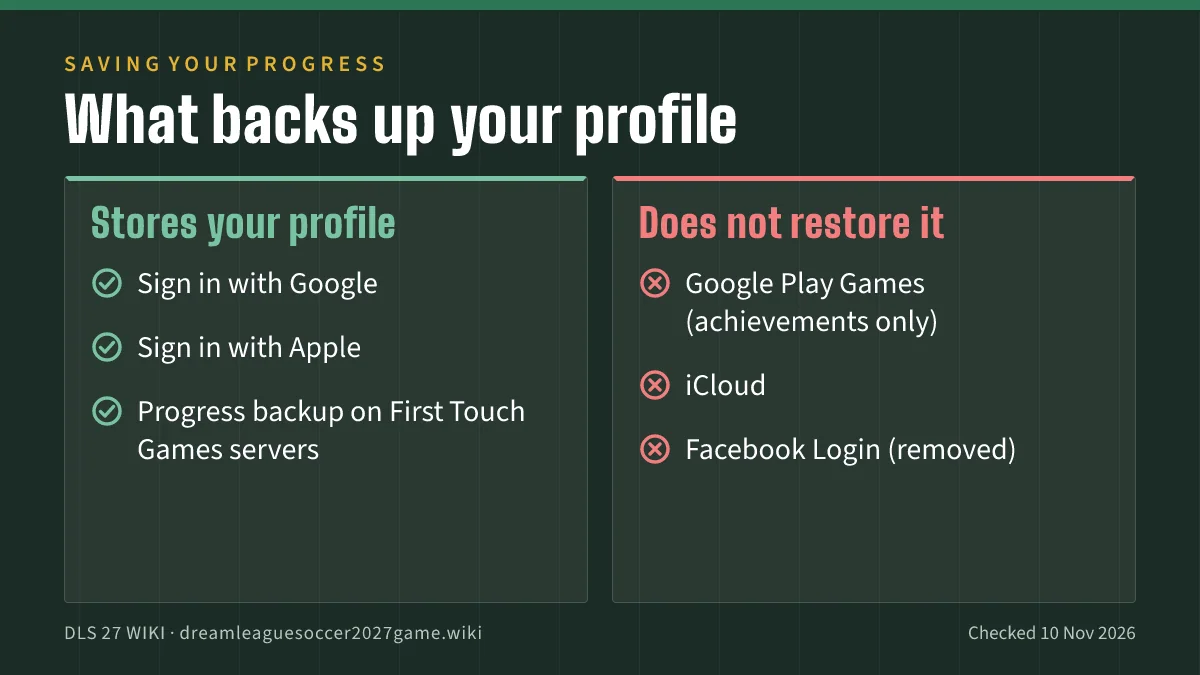
Several systems sound like cloud saves but do not replace FTG’s Google/Apple link.
| Service | Status | FTG position |
|---|---|---|
| Sign in with Google / Sign in with Apple | Verified | Primary way to store and restore profiles (save overview). |
| Google Play Games | Verified | Does not store game profiles; may register achievements only (4413273241873). |
| iCloud | Verified | Same article: iCloud does not store restorable DLS profiles. |
| Facebook Login | Verified | Removed; profiles tied to Facebook Login cannot be recovered (removal article). |
| Game Center auto sync | Unverified / outdated | Older FAQs conflict with 2024 to 2026 save articles; follow 4413273241873 first. |
If you log out of the Google or Apple link without another recovery path, FTG warns the profile is susceptible to loss if you uninstall or change devices (Verified).
How do you transfer Dream League Soccer to another device?
Use the same Google or Apple account on both phones when possible. When accounts differ, use the one-time device code flow described in FTG Support:
- On the old device, open Manage Devices and tap Generate Code.
- On the new device, open Link Profile and type the code (Verified wording: “Type this code into the Link Profile section on your new device,” 4413273241873).
Install the game from Google Play or the App Store only (see our download and update guide). Do not copy APK folders from unknown sources; that risks bans and malware (blocked policy).
Will DLS 27 keep your DLS 26 progress?
| Topic | Status | Notes |
|---|---|---|
| DLS 26 → DLS 27 squad, coins, facilities | Not announced | No FTG FAQ dedicated to DLS 27 migration on 10 Nov 2026. |
| Same store package across yearly seasons | Reported / inference | Play still uses com.firsttouchgames.dls7 for the 2026 title; past seasons used season updates on one listing (Reported, GamingOnPhone on DLS 25). This is not a promise about DLS 27. |
| DLS 19 profile in modern DLS | Verified no | Support: DLS19 profiles will not work in the latest version of DLS. |
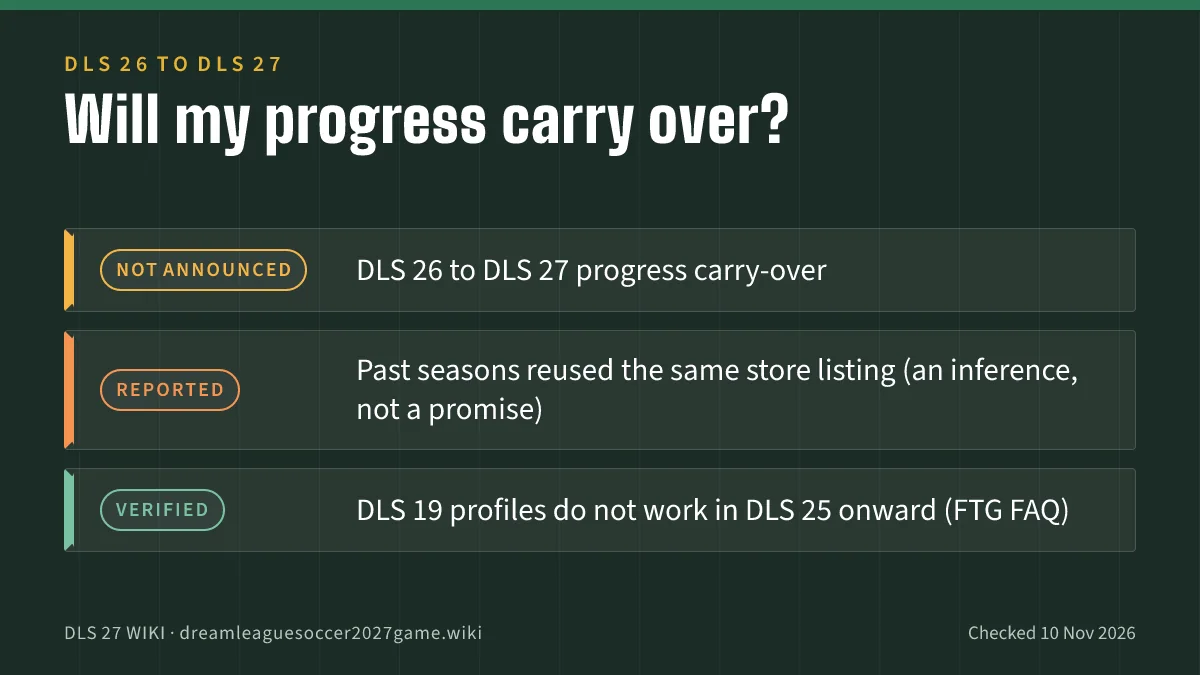
Community posts sometimes claim annual updates keep players. Example: a Reported Reddit thread where a user wrote the game would update and you would keep your players. That is player discussion, not FTG policy. Wait for Verified store release notes or Support posts before you assume zero wipe risk.
Until DLS 27 details land, protect the account you have now:
- Confirm Google/Apple sign-in shows linked before any uninstall.
- Run the device code flow before you trade in a phone.
- Watch is DLS 27 out for the moment the store title changes from 2026 to 2027.
What should you do before the next season update?
These steps follow Verified mechanics, not rumors about DLS 27.
- Link sign-in tonight, not on launch day when servers spike.
- Screenshot your manager name and division for support tickets if something breaks (FTG may still ask for account details you control).
- Update only via official stores after reading our fake APK warning.
- Read patch notes in-app once the update installs; do not trust repost blogs for economy changes.
FTG will not give you a release calendar (When will the next app update be?). Track release date reporting as Reported context, then verify on the store.
Where can new players learn the live game systems?
Save data sits underneath everything else in Dream League Soccer. If you are still learning divisions, clans, and Exhibition mode, start with the beginner guide (DLS 26 baseline). Economy basics live in how to get coins fast without hacks.
We could not verify a working dreamleaguegame.com landing page in our environment, so official links on this site point to firsttouchgames.com and support.ftgames.com.
Related Articles
guides
Dream League Soccer 2027 Beginner Guide: Start in DLS 26
A DLS 26 systems map for new players from Verified store and Support facts: modes, clans and facilities. Anything about DLS 27 is Not announced yet.
guides
Dream League Soccer 2027 Formations Guide (No Meta Ranks)
Verified steps to change formation and Auto-Runs in DLS 26, plus general 4-3-3 and other shapes. Reported media lists are not official season menus.
guides
Dream League Soccer 2027 Download: Not Out Yet, Safe Steps
Install or update DLS only via Google Play and the App Store while stores still list Dream League Soccer 2026. Official links, IDs, and fix tips.
Was this helpful?
Thanks for the feedback!